
Spec-Driven Development with Claude Code
As a software/security architect, I’m constantly evaluating tools that promise to transform developer productivity, code quality, and system design. So when Claude Code started gaining traction in the community, I decided to put it to the test and start using it intensively since January. My latest project is a a Dutch word game inspired by Connections: Woordgroep.
This post isn’t a getting-started guide.
It’s a lessons-learned summary: the patterns that worked, the mistakes worth avoiding, and a workflow that meaningfully reduced both cost and implementation time using spec-driven development.
Why AI Coding Tools?
I see many ‘vibe-coding’ projects end in the gutter with the developers demoralized and demotivated. So my motivation was pretty straightforward: reduce the gap between intent and implementation. AI tools promise faster development cycles and tighter alignment between what you want and what gets built. So how is good way to do that?
As for choosing Claude Code specifically: there’s no grand reason. I’ve had solid experiences with OpenAI’s Codex too. But OpenAI’s direction as a company gave me chills (their ad ambitions and anti-human vision in particular), and the reviews I read about Claude Code were compelling enough to give it a proper try.
Setup Experience
1. Technology selection: manually with AI as sounding board
Don’t let the AI pick your technology stack. Define it yourself, then use Claude as a critic.
- If you are not sure, ask for a comparison between different technologies on the market.
- If you are sure, ask it to play devil’s advocate:
“As a software architect, you see a competing project with Tailwind CSS as UI framework. Why was this a bad design choice?”
This framing matters. AI tools have a tendency to agree with whatever you propose — so explicitly prompt for challenges and objections. Asking Claude to take the role of an auditor or a skeptical senior architect tends to produce much more useful feedback.
One hard rule: don’t include technologies you don’t understand at a basic level. I’m not suggesting you need to be an expert in everything you use, but you should be able to read, modify, and debug the code when the AI isn’t available. Full dependency on a tool you can’t reason about is a genuine business risk.
2. Project setup: manually
For all the greatness of AI, it’s bad at obtaining the state of the art. When I start a new project, I want the latest stable version to start from. AI models are trained on historical data up to a cutoff date, so it often includes outdated versions and syntax.
The fix is simple: go to the official documentation and follow the quickstart guide yourself. For any dependency, like Spring Boot or a frontend framework, the official “Getting started” page will give you the current stable version, the correct setup commands, and knowledge of how it works.
This also saves you from burning tokens on “deep thinking” research sessions where Claude crawls the web for the most recent version numbers. That time and money is better spent elsewhere.
For project structure, I keep everything in a single Git repository, organized so both the AI and I can navigate it clearly:
- Root: spec files
/frontend: frontend application code/backend: backend application code/e2e: end-to-end test suite
3. Configuration of Claude: AI start, Manual refinement
Start by running /init inside Claude Code.
This generates a CLAUDE.md file that Claude loads at the start of every session: it is the project context.
Getting this file right is high-leverage and important work, because a well-crafted CLAUDE.md pays dividends across every future interaction.
After the initial generation, I go through it manually and:
- Remove noise: unnecessary comments, redundant instructions (Keep context small)
- Add a project summary: a short description, the target language, and key non-negotiables (e.g., “must be mobile-responsive”, “GDPR-compliant”)
- Verify the build and run scripts, that Claude is allowed to run
- Embed architectural principles: naming conventions, dependency boundaries, patterns to follow or avoid
- How to interact with code versioning, like Git
I also configure explicit permissions in .claude/settings.local.json. For example, allowing Claude to automatically stage new files in Git:
{
  "permissions": {
    "allow": [
      "Bash(git add:*)"
    ]
  }
}
Small things like this remove friction from the feedback loop while running Claude Code.
4. Setup Spec: manually
I added a special command inside the project root: .claude/commands/spec.md that will be used to create a complete specification document for a new feature:
Create a spec file based on the template @spec_template.md using the following input: $ARGUMENTS

Requirements:
- Name the file using the format: spec{NUMBER}_{TITLE}.md

Fill in all placeholders marked with "{}" as follows:
- NUMBER: incremental number (001, 002, 003, ...)
- TITLE: concise title of the specification
- DESCRIPTION: detailed functional description written in the style of a functional analyst
- EXTRA: key considerations like legal constraints, technical limitations or implementation pointers
- TASK_NUMBER: break down the feature into clearly separated tasks; the final task must always include a test plan
- STEPS_PLAN: for each task, a structured sequence of concrete steps, (similar to an algorithmic decision tree). The last step contains the test plan
And the contents of spec_template.md:
# Spec {NUMBER}: {TITLE}

## Goal

{DESCRIPTION}

## Notes

{EXTRA}

## Tasks

### Task {TASK_NUMBER}

{STEPS_PLAN}
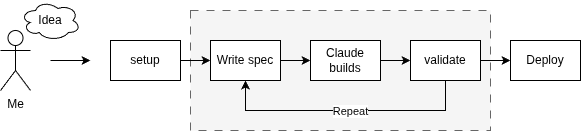
The Development Loop
With setup out of the way, the actual workflow follows four steps.
1. Write the Spec: AI and manual verification
Let’s say I want to add security and authentication on the website I’m building. I need to invoke the custom command with a rough description of the feature:
/spec I want the website to have an authentication screen.
Claude will generate a detailed specification quickly. Read it critically. Often the output will reveal an assumption mismatch — for example, Claude might propose username/password authentication when I was thinking OAuth with social media providers like Google and Microsoft. This change is big. So when that happens: don’t patch the spec, but start over with a sharper prompt:
/clear
/spec I want the website to have an authentication screen where users can log in with either Google or Microsoft accounts.
When I want small changes, I immediately add and edit them in the file. The level of detail Claude requires is surprising, and that’s exactly the point. A precise spec gives Claude a clear target to implement against — which dramatically improves the quality and predictability of the output. The alternative is using plan-mode of some AI-agents. The problem with that is that you will lose the initial plan. This specification file is immediately the documentation of the project.
2. Implementation: AI
This is the easy part. Hand the spec to Claude and let it work for you:
Execute all tasks in @spec004_authentication.md
Depending on the complexity of the spec, this takes anywhere from 2 to 15 minutes.
3. Test and review: Manually
The most fun step: testing the feature. I have been amazed about how well the AI solves the task, often without any correction needed. If something is fundamentally wrong: roll back the changes, improve the specification and restart the process.
If the issues are cosmetic — a font size, a color, a label — just fix them yourself. This is a mistake I see developers make repeatedly: using AI for tiny adjustments that would take 30 seconds to fix manually. By the time you’ve written the prompt, waited for the output, and re-tested, you’ve lost two minutes and introduced another review cycle. Beyond efficiency, there’s a subtler reason to stay hands-on for small fixes: it keeps you connected to the codebase. That familiarity matters.
After the test, I do a quick code review, and look for hallucinations, edge cases or logic errors.
4. Commit and repeat: Manually
If I’m pleased with the result, I’ll commit the changes into Git. After this we can start thinking about the next feature
Takeaways
AI is going to stay. AI is not a hype that will go away like blockchain or NFT. The benefits are huge and the price of AI is currently peanuts, but this might change.
A well-written spec outperforms a clever prompt. The upfront investment in a precise, well-structured specification pays back many times over in implementation quality. Remember that vague prompts produce vague results.
Know when not to use AI. For small, targeted changes, your hands are faster than the model. For structural design choices will human experience outperform AI.
What’s Next
- Living documentation: I want specs to be the documentation. When a feature changes, “re-speccing” it keeps both the AI context and the project docs in sync — one artifact for two purposes.
- MCP servers, skills and agents: I’ve only scratched the surface here. There’s more to explore in terms of extending Claude Code with specialized tools and workflows.